Resolume vs MadMapper for Projection Mapping — Which Do You Need?
Short version: Resolume Arena is a live VJ instrument that also does real projection mapping. MadMapper is a mapping specialist that doesn't try to be a VJ rig. For most stage, club, and festival work, Arena's built-in mapping is all you need — and it's already where you mix your visuals. Reach for MadMapper when the geometry gets complex: irregular architecture, many-faced objects, permanent installations, or pixel-precise LED layouts. Plenty of pros run both.
What Each One Is Actually Built For
This is the whole comparison in two sentences, so start here:
- Resolume Arena is first and foremost a VJ and live-visuals platform — you load clips into a grid, layer them, mix in real time, and trigger effects while the music plays. Projection mapping is one of its capabilities, not its reason for existing.
- MadMapper (currently MadMapper 6, by GarageCube and 1024 Architecture) is first and foremost a dedicated mapping tool. It's the desktop standard for architectural and installation mapping, LED, DMX lighting, and laser shows — but it isn't a clip-mixing VJ instrument.
Neither is "better." They're built for different jobs, and knowing which job you're doing tells you which tool to reach for.
Mapping in Resolume Arena
First, the correct-and-often-misquoted fact: real projection mapping in Resolume requires Arena, not Avenue. It lives in the Advanced Output window, in two stages:
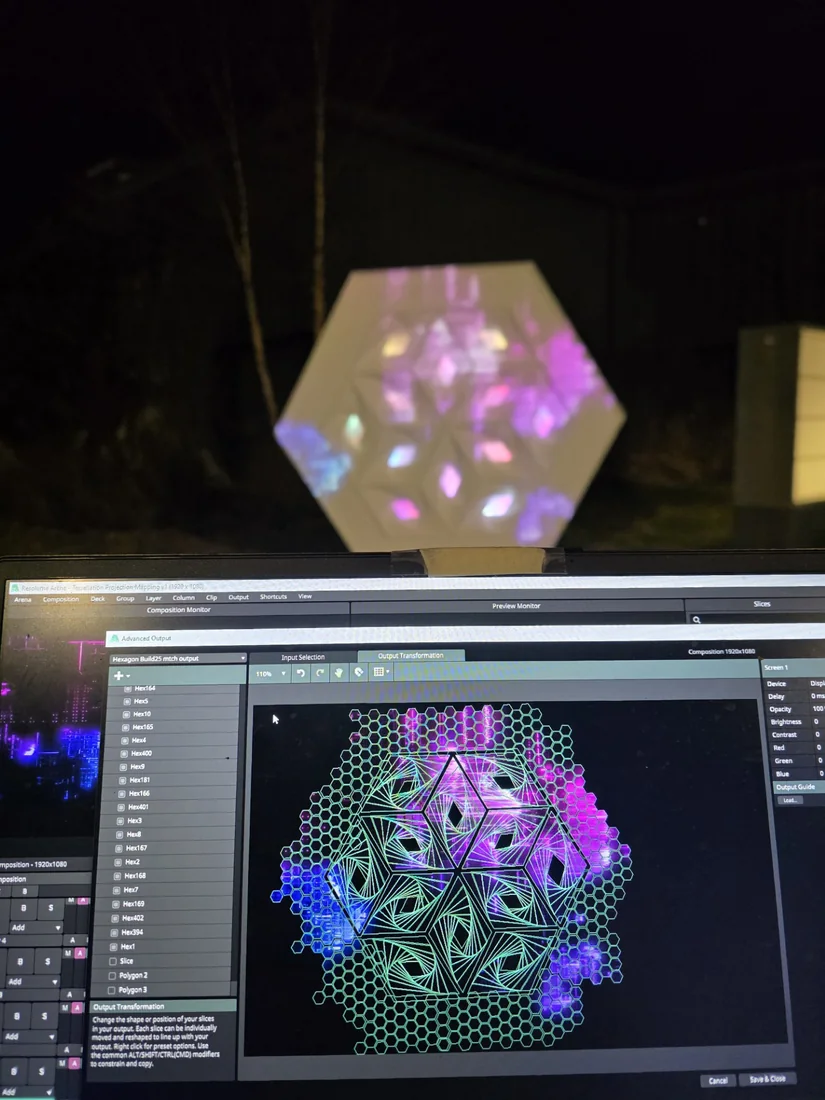
- Input Selection — you carve your composition into slices (rectangular or, in Arena, polygon), each routed to part of your output. That's the hex-slice grid you can see in the shot above.
- Output Transformation — you physically align those slices to the real surface: perspective and Bezier warping, masking, per-slice flip and color, and edge blending to stitch overlapping projectors into one seam-free image (plan ~15% overlap).
Arena also drives LED walls and DMX fixtures by pixel-mapping colors from your composition out over Art-Net. So for a VJ running stage screens, a club's surfaces, or a festival's LED wall, Arena's mapping is genuinely capable — and it's all in the same app you're already performing in. (Deeper dives: our display & output tips and Arena vs Avenue guide.)
Where MadMapper Pulls Ahead
When the geometry stops being "a few flat screens" and becomes complicated — irregular buildings, sculptural objects with many faces, multi-projector rigs that must be calibrated to the millimeter — MadMapper is simply in a different league. What it's built to do:
- Mesh warping & complex surfaces — bend content onto curved and irregular geometry with a precision Resolume doesn't chase.
- Multi-projector calibration — align and blend many projectors across one large or wrapped surface.
- Pixel & LED mapping — map to LED strips, panels, and pixel setups; control LED arrays and DMX fixtures in real time; drive lasers.
- Scale — markets support for content up to 16K, for large-format installation work.
- Show building — MadMapper's Timeline adds native sequencing with keyframe animation, audio sync, and BeatTracking for structured, repeatable installation shows.
The trade is a steeper learning curve — pixel-precise calibration and irregular-surface mapping take time to master — but that's the cost of control you can't get elsewhere.
The Pro Move: Use Both
Side by Side
| Resolume Arena | MadMapper 6 | |
|---|---|---|
| Built for | Live VJing & visuals (mapping included) | Projection mapping & LED/DMX (mapping specialist) |
| Live clip mixing | Yes — its whole design | No — not a VJ clip grid |
| Complex geometry / architecture | Good for most stage & screen work | Best in class |
| Pixel / LED / DMX mapping | Yes (Art-Net pixel mapping) | Yes — deep and precise |
| Effects ecosystem | Huge (FFGL plugins, 100+ effects & sources) | Focused on mapping, not FX mixing |
| Learning curve | Beginner-friendly (~15 min to a basic show) | Steeper, especially calibration |
| Price | Avenue €299 · Arena €799 (mapping) | Free (watermarked) · ~€44/mo · ~€479 perpetual |
MadMapper details and pricing verified July 2026 from madmapper.com; prices are approximate and shift with sales and versions — confirm current listings before buying.
So Which Should You Pick?
- Choose Resolume Arena if you're performing live — clubs, festivals, stages, tours — and want one expressive tool for both content and output. Its mapping covers the vast majority of VJ scenarios, and it has the biggest community and the most tutorials.
- Choose MadMapper if your core challenge is the mapping — complex architecture, sculptural objects, permanent installations, big multi-projector calibration, or heavy pixel/LED/DMX work — more than live clip mixing.
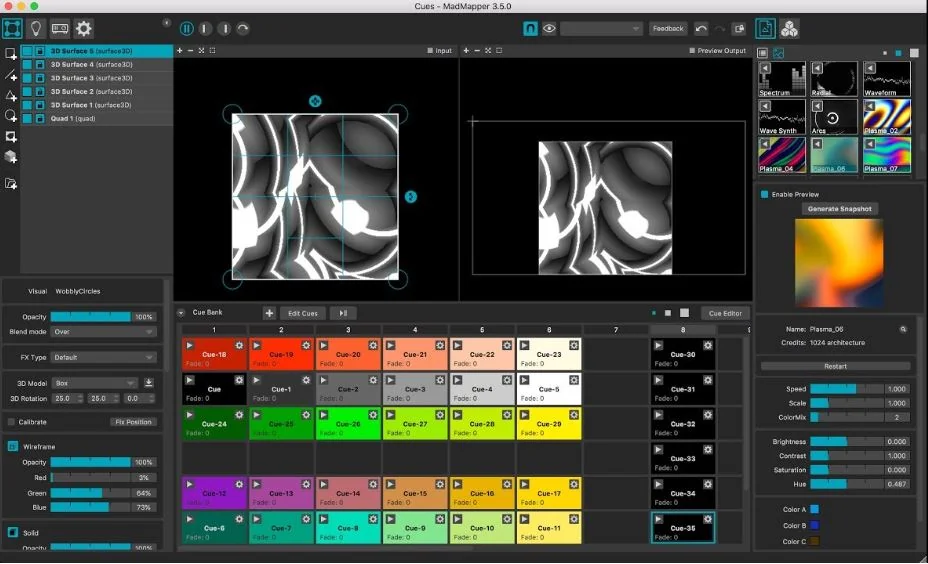
- Run both if you want live VJ expressiveness and surgical mapping: Resolume → MadMapper over NDI/Syphon.
For most people reading this — VJs who want to perform and map without juggling two apps — Resolume Arena is the right first tool, and it's exactly what we teach. When a project's geometry outgrows it, you'll know, and MadMapper (or Resolume feeding MadMapper) will be waiting.
Frequently Asked Questions
Can Resolume do projection mapping, or do I need MadMapper?
Resolume Arena does real projection mapping — slices, perspective and Bezier warping, masking, edge blending, and pixel/LED mapping — all inside its Advanced Output. For most VJ, stage, and club work that's everything you need, and it's already where you're mixing your visuals. MadMapper becomes worth it when the geometry gets genuinely complex (irregular architecture, many-faced objects, permanent installations) — that's the job it's built for.
What's the real difference between Resolume and MadMapper?
Resolume Arena is a live VJ instrument first — a clip grid you mix, layer, and trigger in real time — with projection mapping as one of its capabilities. MadMapper is a mapping tool first: it doesn't mix clips like a VJ rig, but for calibrating complex surfaces, multi-projector blends, and pixel-precise LED/DMX layouts, nothing beats it. Different jobs, not better-or-worse.
Do professional VJs use Resolume or MadMapper?
Plenty use both. The common pro setup is Resolume as the content and performance engine, feeding its output into MadMapper for the mapping and calibration, connected over NDI (or Syphon on macOS). You get Resolume's expressive live mixing and MadMapper's surgical mapping in one signal chain.
Is MadMapper harder to learn than Resolume?
Generally yes. Resolume is drag-and-drop and you can have a basic show running in about 15 minutes. MadMapper has a steeper curve — especially pixel-precise calibration and irregular-surface mapping — but that difficulty buys you control Resolume doesn't try to match on complex geometry.
How much does each cost?
Resolume: Avenue is €299 (no mapping), Arena is €799 (mapping included). MadMapper: a free version with watermarked output, a temporary license from about €44/month, or a perpetual license from around €479. If you already run Arena for VJing, you may not need to spend anything more to start mapping.
Learn to Map in Resolume — With People Who Actually Do It
Inside VJ Academy: hands-on Resolume mapping walkthroughs, the Advanced Output demystified, and 600+ working VJs (many mapping real installations) to ask when your surface won't line up. 100+ tutorials, exclusive plugins, and a structured path from first slice to full show.
Resolume mapping details sourced from the VJ Academy knowledge base; MadMapper details from madmapper.com, July 2026. Questions? Email vjacademy@outlook.com.